If your company makes, services or designs anything on the U.S. Munitions List, your lobby is part of your export-control program. Under the International Traffic in Arms Regulations (ITAR), letting the wrong visitor see the wrong thing can be an export — even if nobody leaves the building.
This guide covers the ITAR visitor requirements that land on the front desk: who counts as a U.S. person, how to screen visitors, when to escort, and which records to keep. It is general guidance, not legal advice — your Technology Control Plan and your Empowered Official have the final word.
Why visitors matter under ITAR
ITAR controls defense articles and the technical data behind them. Under 22 CFR 120.56, technical data is "released" when a foreign person visually inspects a defense article in a way that reveals technical data, or when it is shared orally or in writing. A release to a foreign person inside the United States is treated as an export — often called a deemed export.
That means a factory tour, a whiteboard left uncovered in a meeting room, or a prototype on a bench in view of a visitor can all be exports that need authorization. The front desk is where you find out who is walking in.
Who counts as a U.S. person
22 CFR 120.62 defines a U.S. person as, in short:
- U.S. citizens
- Lawful permanent residents (green card holders)
- Protected individuals, such as people granted asylum or refugee status
- Companies incorporated to do business in the United States, and U.S. government bodies
Everyone else is a foreign person — including foreign nationals working in the U.S. on a visa. Citizenship alone does not decide it: a green card holder is a U.S. person under ITAR, while a visa holder is not.
ITAR visitor requirements at the front desk
- Know every visitor before they arrive. Pre-register guests with their host, company and purpose of visit, so security can review sensitive visits in advance.
- Establish U.S.-person status. Ask every visitor whether they are a U.S. person, and follow your Technology Control Plan for how that answer is verified.
- Screen against denied-party lists. Check names against the U.S. government's Consolidated Screening List, which combines export-screening lists from the Departments of Commerce, State and the Treasury — including the State Department's debarred parties.
- Hold, don't argue. If a visitor matches a list or declines to answer, pause the check-in discreetly and route it to security or your Empowered Official for review.
- Escort and restrict foreign persons. Issue badges that make status visible to staff, assign an escort, and keep foreign persons out of controlled areas unless a license or other authorization covers the visit.
- Collect agreements. Have visitors acknowledge site rules and sign NDAs before entry where your program requires it.
- Keep the record. Log who visited, when, whom they saw, their U.S.-person answer, the screening result and any review decision. Registrants must keep ITAR records for five years under 22 CFR 122.5; many companies apply the same period to visitor logs.
Where the Technology Control Plan fits
Most ITAR-registered companies document visitor handling in a Technology Control Plan (TCP): which areas are controlled, who may escort, how U.S.-person status is verified, and what happens on a screening match. The front desk is where the TCP is enforced every day — so the check-in process should mirror it step for step, not rely on a receptionist remembering it.
How CoReceptionist handles ITAR visitor screening
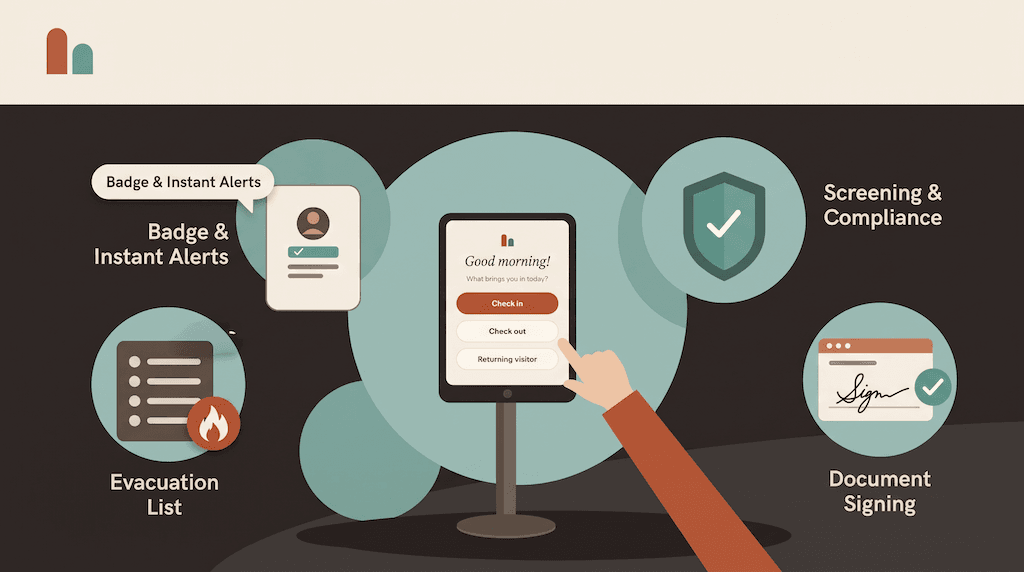
CoReceptionist builds these steps into check-in, so they happen the same way at every door:
- Citizenship question: the kiosk asks "Are you a U.S. citizen?" for the visitor types you choose.
- Consolidated Screening List checks: visitor names are screened at check-in, with a minimum match score you set.
- Your own watchlist: add names with exact, contains or sound-alike matching.
- A discreet hold: on a match, the visitor sees a polite "one more step" message and no badge prints.
- Review and decide: the people you choose are emailed, and your team reviews each match and records its decision in the visit record.
- Records on file: every visit, answer and decision is stored and exportable for audits.
See how to set up ITAR and watchlist screening, read more about denied-party screening for visitors, or see how aerospace and defense teams run their front desk. New to the category? Start with our visitor management system guide.
Frequently asked questions
Does ITAR require a visitor log? ITAR requires registrants to keep records of exports, and a visitor who sees technical data may be an export. A visitor log with U.S.-person status and screening results is the practical way to show who had access and why.
Is a green card holder a U.S. person under ITAR? Yes. Lawful permanent residents are U.S. persons under 22 CFR 120.62. Foreign nationals on work visas are not.
How often should visitors be screened? On every visit. Screening lists change, so a visitor cleared last month should be screened again today.
This article is general information, not legal advice. Consult your export-compliance counsel or Empowered Official for decisions about your program.