The holidays are the busiest quiet season of the year. Half the team is on PTO, the other half is hosting clients, and the lobby fills with couriers, caterers, contractors and family visitors. A visitor management system keeps every arrival recorded and every host notified, even when nobody is at the desk.
This guide to holiday visitor management covers why the season strains the front desk, how to manage guests when people are in and out of the office, how to bring your brand and holiday messaging to check-in, which procedures to set before December, and which industries feel the rush most.
Why the holidays strain the front desk
From late November through early January, the usual visitor pattern breaks. The front desk has to absorb more variety with fewer people. Common pressure points:
- Coverage gaps. Receptionists and office managers take time off too, often in the same weeks as everyone else.
- Absent hosts. Visitors arrive for people who are on PTO, working remotely or out at client events.
- Delivery surges. Gifts, catering and year-end shipments pile up at reception.
- Event traffic. Holiday parties, client open houses and year-end meetings bring in guests who have never visited before.
- Irregular hours. Early closures and skeleton crews make it harder to know who is in the building at any moment.
A paper sign-in sheet can't keep up with any of these. Visitor management software can.
Managing guests when people are in and out of the office
When hosts come and go, the risk is a visitor waiting in the lobby for someone who isn't there. A visitor management system closes that gap at each stage of the visit.
Before the visit. Hosts pre-register holiday guests and send QR invitations before they leave for PTO. The visitor arrives with everything ready, whether or not the host is at their desk. See our guide to pre-registering guests and walk-ins.
At arrival. Visitors use the self check-in kiosk or touchless QR check-in. No receptionist is needed to greet, log or badge them.
Host notifications. The host gets an instant alert by email, SMS or Slack the moment their guest arrives, so hosts working remotely still know who showed up. Add a second notification rule so arrivals also reach a team inbox, a Slack channel or a colleague who can greet the guest.
During the visit. The dashboard shows a live list of who is on site. That matters most on skeleton-crew days, when fewer staff are watching the door.
At departure. Visitors check out at the kiosk, or automatic check-out closes the visit at the end of the day. Your visitor log stays accurate even when the office empties early.
Brand presence: make check-in feel like the season
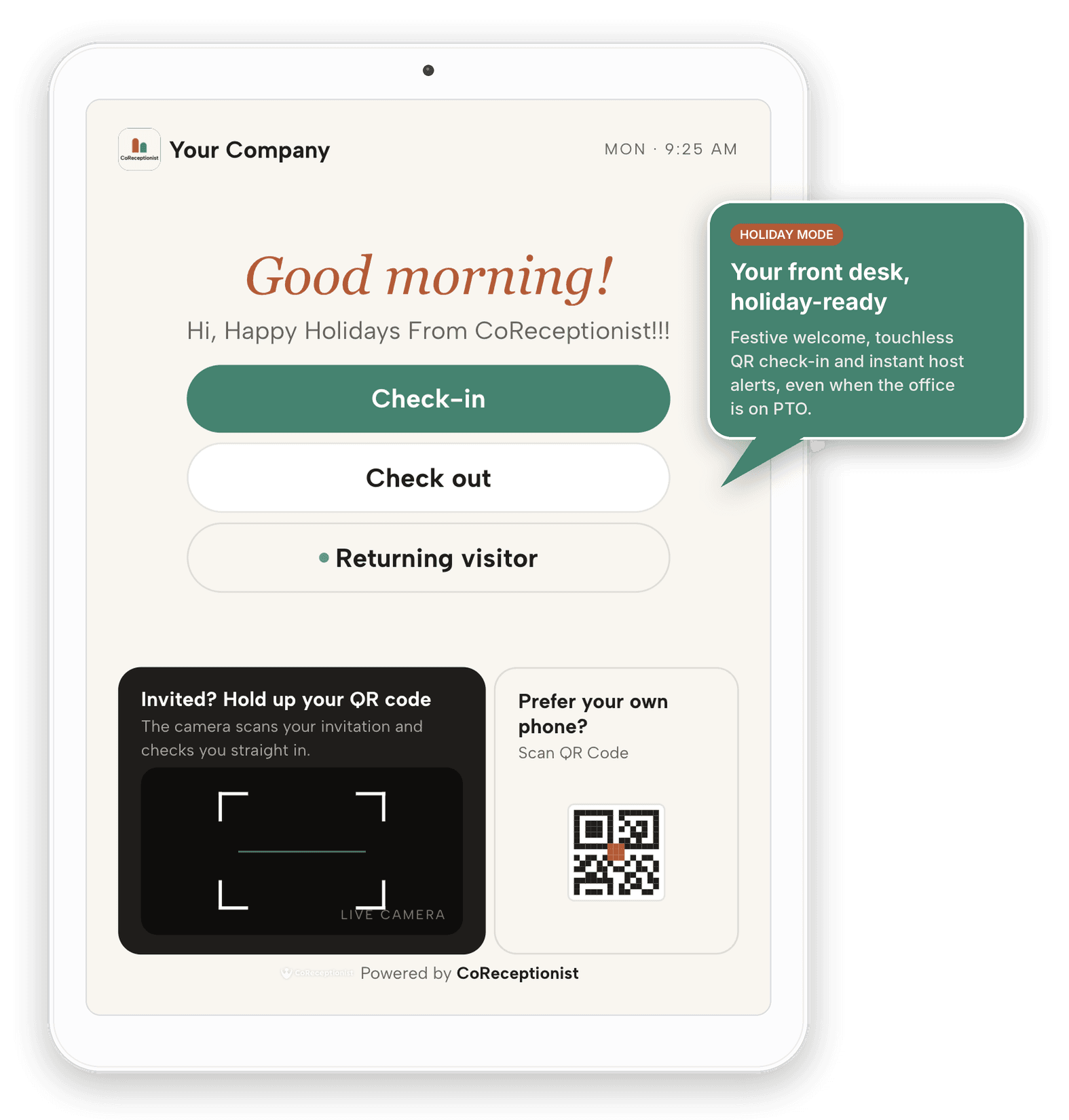
The check-in screen is often the first thing a holiday guest sees. With custom branding, your check-in kiosk looks like your company instead of a generic tablet.
- Your look, your colors. Add your logo, brand colors and a background image so the kiosk matches your lobby.
- Holiday messaging. Swap in a seasonal welcome, such as "Happy holidays from all of us at [Company]" or a thank-you to clients for the year.
- Practical notices. Post holiday hours, early closures, parking changes or where to drop off gifts and deliveries right on the welcome screen.
- Event-specific check-in. Give your holiday party or client open house its own welcome so guests know they are in the right place.
When the season ends, switch back to your standard welcome in a few clicks. More on touchless, multilingual, on-brand check-in.
Holiday procedures that keep the front desk covered
A few workflow changes before December keep the lobby secure while staffing is thin. Set them once in the CoReceptionist dashboard and they run on their own.
- Backup notifications. Add a second notification rule for each host so arrivals also reach a team inbox, a Slack channel or an on-call colleague while the host is away.
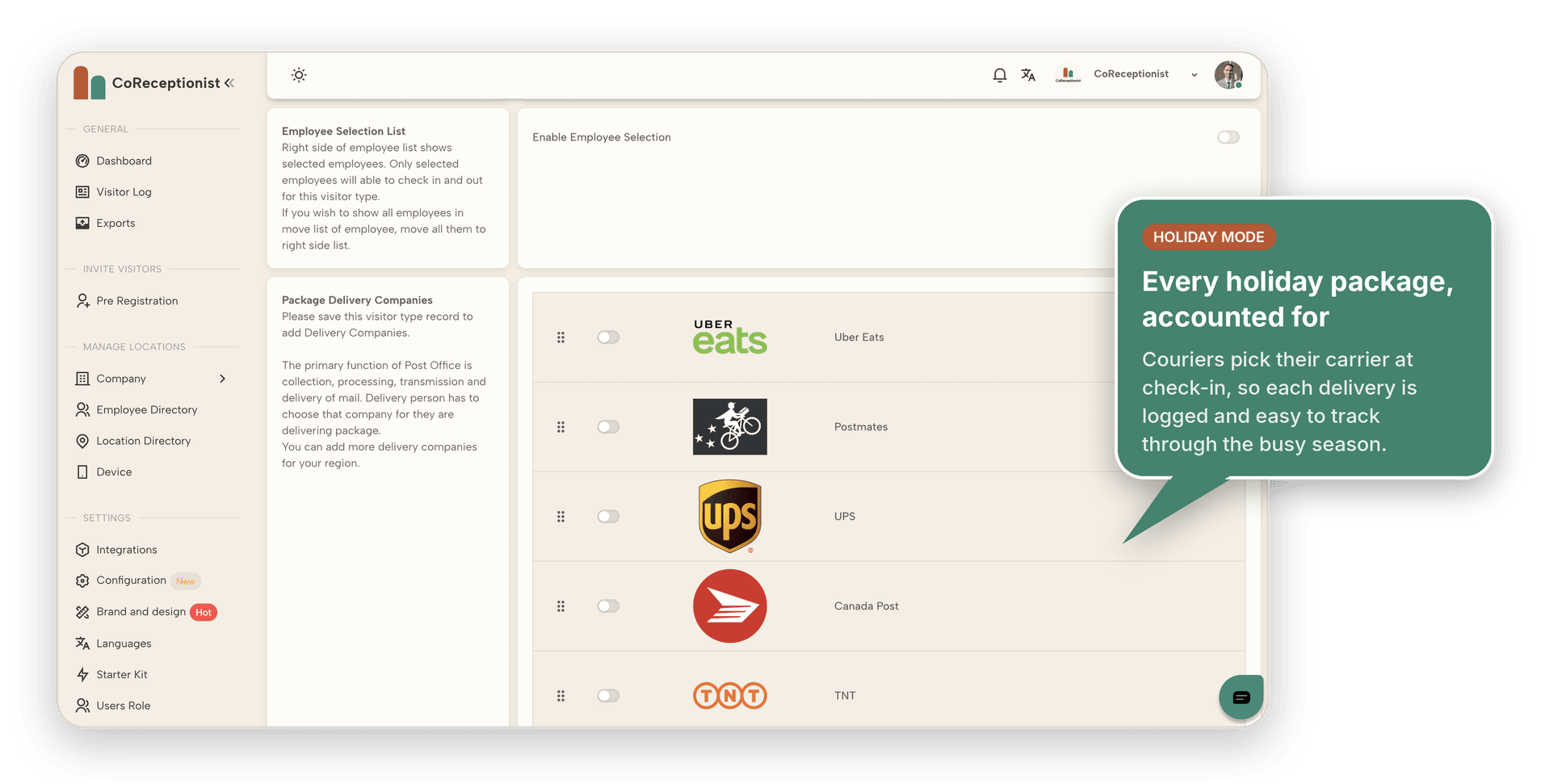
- Delivery and courier flow. Holiday gifts, catering and year-end shipments pile up fast. Add the carriers you use, such as UPS, Canada Post or Uber Eats, so couriers pick their company at check-in and every package is logged and easy to track. More in deliveries are visits too.
- Contractor sign-in. Year-end maintenance and office moves bring in vendors. Use contractor sign-in to require signed documents and safety acknowledgments before entry.
- Visitor screening. Keep watchlist screening on, even on quiet days, so every visit is still checked.
- Evacuation roster. With fewer staff on site, a live roster tells you exactly who is in the building in an emergency. See evacuation drills and the roster.
- Audit-ready visitor log. Every arrival and departure is recorded and exportable, so January reviews don't depend on a paper binder.
Who feels the holiday rush most?
Every front desk changes in December, but some industries feel it more than others.
Corporate offices** and coworking spaces.** Hybrid schedules and PTO leave hosts out more often. Client open houses and parties bring first-time guests.
Logistics and warehousing. Peak shipping season brings extra drivers, carriers and temporary staff to the door. Every delivery and visitor needs a record.
Healthcare. Clinics stay open with reduced staff while family visits and vendor deliveries rise. Screening and accurate logs still apply.
Education. Winter concerts, class parties and volunteer helpers bring more parents and guests on campus. Every visitor still needs to be checked.
Manufacturing** and aerospace.** Year-end shutdowns bring maintenance contractors on site. Contractor sign-in and ITAR visitor screening don't take a holiday.
Government** and legal.** Reduced hours don't reduce compliance. Records must stay complete and exportable.
Residential buildings. Package volume spikes and guests visit residents over the holidays. A digital front desk keeps both organized.
Getting holiday-ready
Set up your front desk for the season in four steps:
- Map the calendar. List PTO, early closures, events and expected deliveries for December and early January.
- Set up backup notifications. Add a team inbox, Slack channel or colleague to each host's notifications, and check that every host has notifications turned on.
- Refresh the welcome. Update your check-in screen with holiday messaging, seasonal hours and event instructions.
- Test it. Run a test check-in for a guest, a courier and a contractor before the first holiday event.
New to visitor management? Start with What is visitor management? A practical guide.
Frequently asked questions
What happens if a visitor arrives and their host is on PTO? The host still gets the arrival alert by email, SMS or Slack. If you add a second notification rule for a team inbox, a Slack channel or a colleague, someone on site hears about the guest too. If the host pre-registered the visit, the guest checks in without help.
Can we change our check-in screen just for the holidays? Yes. Update the welcome message, background and notices for the season, then switch back to your standard branding in January.
Do we still need visitor management if the office is mostly empty? Yes. Quiet weeks are when an accurate visitor log and a live list of who is on site matter most, because fewer people are watching the door.
Get your front desk ready before the first holiday guest walks in. Try CoReceptionist free for 14 days, no credit card required.
Keep reading